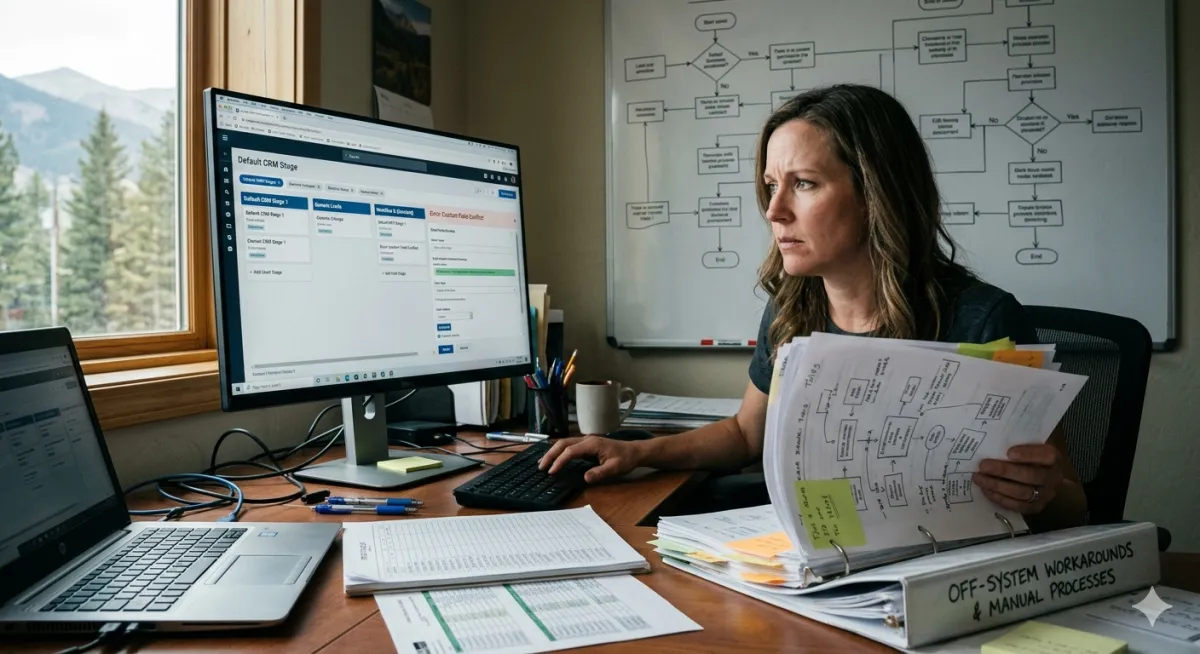
Does the Tool Fit How You Actually Work, or Are You Bending to Fit It?
The tell is whether the system disappears into your day or fights you.
If you have ever changed how you do business because a piece of software could not handle how you already do business, you have experienced the most common and least discussed cost of technology adoption. The tool was supposed to make things easier. Instead, you reshaped your process, your workflow, or your team's habits to match what the tool could do. And at some point, you stopped noticing.
This post is about that moment, and about how to tell whether your current setup is serving you or training you to serve it.
The short answer: Off-the-shelf software works well when your business processes are standard. Custom or configured systems work better when your processes are specific to how you actually operate. The mistake most small businesses make is not choosing the wrong category. It is never asking the question. They adopt a tool, bend their work to fit it, and assume the friction is normal. It is not. The friction is the tool telling you it was built for someone else's business.
How Do You Know If You Are Bending to Fit the Tool?
You are bending to fit the tool when you change a business process to accommodate software limitations rather than the other way around. The signs are specific and measurable. You maintain a spreadsheet alongside your CRM because the CRM cannot track something your business needs. You follow up with clients differently than you would prefer because the automation only works one way. You skip a step in your intake process because the platform does not support it without a workaround.
Research on CRM implementation shows that 20% to 70% of CRM projects fail to meet their objectives, and user adoption is the leading cause. That failure rate is not about bad technology. It is about misfit. The tool was designed for a type of business that does not match how the specific business actually works. The team resists because the system makes their real work harder, not easier.
The tell is simple: does the system disappear into your day, or do you have to think about the system while you are trying to think about your work? A well-fitted tool is invisible. A poorly fitted one demands attention it has not earned.
When Is Off-the-Shelf Software the Right Choice?
Off-the-shelf software is the right choice when your business process is standard enough that the tool's built-in workflows match what you actually do. Payroll, basic invoicing, appointment scheduling, email marketing for a simple list. These are commodity functions that most businesses handle the same way.
If you are running payroll for a small team, QuickBooks or a similar platform at $30 to $200 a month will outperform a custom build every time. The math is straightforward: the off-the-shelf version costs less, updates automatically, handles compliance changes, and does the job.
The same applies to scheduling tools, basic email platforms, and simple website builders. If the process is standard and the tool handles it without workarounds, off-the-shelf is not just acceptable. It is the smarter choice. Paying more for custom when standard works is its own kind of waste.
The question is not "is off-the-shelf bad?" It is "does this particular off-the-shelf tool match this particular business process?" When the answer is yes, stop looking. When the answer is "mostly, except for these three things," those three things are worth examining closely.
When Does Off-the-Shelf Start Costing More Than It Saves?
Off-the-shelf starts costing more when the workarounds accumulate. Industry research shows that the average business pays 2 to 4 times more for off-the-shelf solutions when you factor in licensing, customization, and workarounds over time. That number surprises most people because the subscription fee looks small. The hidden costs are in the hours.
Here is a common pattern. A small service business signs up for a CRM at $97 a month. The CRM handles contacts and basic email. But the business also needs lead qualification, automated follow-up sequences timed to specific triggers, a pipeline that matches their actual sales process (not the generic one the CRM assumes), and integration with their scheduling and invoicing tools. The CRM can do some of this with add-ons. Some of it requires Zapier connections or manual entry. Some of it simply cannot be done.
So the team builds workarounds. A spreadsheet for the pipeline view the CRM does not support. Manual follow-ups for the sequences that cannot be automated in the tool. A separate calendar because the CRM's scheduler does not integrate with their booking system. Each workaround is small. Together, they cost hours every week.
Meanwhile, 53% of SaaS applications go underutilized or unused. The business is paying for features it never turned on while also paying in time for features the tool does not have. That is the crossover point, when the cost of making the tool work exceeds the cost of getting a tool that actually fits.
What Does "Custom" Actually Mean for a Small Business?
Custom does not mean building software from scratch. For most small businesses, custom means configuring an existing platform to match how the business actually operates, rather than accepting the default setup and bending the business around it.
The difference is in the setup, not the technology. Take GoHighLevel as an example. The platform starts at $97 a month and includes CRM, marketing automation, website builder, calendar, and more. Two businesses can use the same platform and have completely different experiences. One accepts the default pipeline, the generic follow-up sequence, and the standard forms. The other has pipelines built to match their actual sales stages, follow-up sequences triggered by specific client behaviors, intake forms that capture the information they actually need, and automations that route leads based on real business logic.
Same tool. Same price. Completely different fit. The second business did not buy custom software. They configured existing software to match how they work. That configuration is the custom part, and it is what most small businesses are actually missing.
At Bennin Systems, this is the core of what we build. When we set up Nancy Clark's real estate CRM, the pipelines match her actual buyer and seller workflows. The follow-up sequences are timed to how her clients actually make decisions. The intake forms capture the specific information she needs for qualification, not generic fields she will never use. The system fits her business. She did not reshape her business to fit the system.
The same principle applied to Scotty's Oil. The chatbot (Emma) does not follow a generic customer service script. It captures fuel orders in the specific format the operations team needs, routes them to the right person, and confirms the details without anyone sitting at a desk. That is not a template. It is a system shaped to a specific business.
How Do You Decide Between Standard and Configured?
The decision framework is simpler than most technology vendors want you to believe. Ask two questions.
First: does your core revenue-generating process (lead capture, client intake, follow-up, service delivery) look like most other businesses in your category? If yes, standard off-the-shelf with good defaults will serve you. If no, if your process has specific steps, specific timing, or specific routing that differs from the generic version, configuration is worth the investment.
Second: where are your workarounds? If you can list three or more places where you compensate for the tool's limitations (spreadsheets, manual steps, things that depend on someone remembering), those workarounds are the map to what custom configuration would solve.
The honest position is that most businesses need a hybrid approach. Research on enterprise software strategy shows that organizations using off-the-shelf for commodity functions and custom configuration for competitive differentiators see roughly 60% cost savings on support functions while maintaining unique advantages in core business operations. That same principle scales down to a five-person company.
Use standard tools for standard work. Configure the tool for the work that makes your business yours.
What About the Cost Difference?
The upfront cost difference between off-the-shelf and custom is real and worth acknowledging honestly. A standard SaaS subscription runs $50 to $300 a month. A properly configured system (same platform, shaped to your business) typically costs $1,500 to $5,000 in setup plus the same monthly subscription, based on typical Bennin Systems project ranges. Full custom software development starts at $100,000 and goes up from there, which is almost never the right answer for a small business.
The relevant comparison is not "monthly subscription vs. custom build." It is "monthly subscription plus annual workaround costs vs. monthly subscription plus one-time configuration." When the annual workaround cost exceeds the one-time configuration cost, staying with the default setup is the more expensive choice.
Most small businesses never run that comparison because nobody frames it that way. The subscription feels cheap. The workarounds feel normal. The configuration feels expensive. But the math often tells a different story.
The Honest Tradeoff
Configured systems take longer to set up. A default CRM account is live in an hour. A properly configured one takes 2 to 4 weeks. During that setup period, you are investing time in documentation, workflow mapping, and testing. That investment is real.
The tradeoff is time upfront for time saved every week after. A system that fits your business saves 30 minutes to 2 hours per day in workarounds, manual steps, and friction. Over a year, that adds up to hundreds of hours. Over three years, the configured system has paid for itself several times over.
The other tradeoff is flexibility. A standard tool lets you start immediately and change later. A configured tool requires more upfront thinking, which means you need to know your process before you build the system. For a business still figuring out its workflow, starting with standard and configuring later is often the right sequence. For a business that knows exactly how it operates and is tired of the workarounds, configuring now saves the most time.
There is no universal right answer. There is only the answer that fits how your business actually works today.
The Bottom Line
The question is not "should I use custom software or off-the-shelf?" The question is whether the tool you are using today fits how your business actually operates, or whether you have been quietly reshaping your business to match the tool's limitations. If the system disappears into your day, it fits. If you spend time thinking about the system instead of thinking about your work, the fit is off.
The fix is not always a new tool. Sometimes it is configuring the tool you already have to match what you actually do. The starting point is the same either way: map your real process, name your workarounds, and ask whether the friction is worth the familiarity.
Next Steps
Map your three most important business processes (lead intake, follow-up, service delivery) in plain language. Then compare that map to what your current tool actually does. The gaps are your workaround list. The workaround list is your configuration brief.
If you want help building a system that fits how your business actually works, that is what Bennin Systems does. Reach out at benninsystems.com or call (406) 224-3267.
Frequently Asked Questions
How do I know if my software fits my business or if I am bending to fit it?
The clearest sign is workarounds. If you maintain spreadsheets alongside your CRM, follow up manually because the automation does not match your process, or skip steps because the platform cannot support them, you are bending to fit the tool. A well-fitted system handles your actual workflow without parallel tracking systems.
Is custom software always better than off-the-shelf?
No. Off-the-shelf is better for standard processes like payroll, basic invoicing, and simple scheduling. Custom configuration is better for revenue-generating processes that are specific to your business. Most small businesses benefit from a hybrid: standard tools for commodity work, configured tools for competitive work.
What does it cost to configure a CRM for a small business?
A properly configured system on an existing platform like GoHighLevel typically costs $1,500 to $5,000 in one-time setup, based on typical Bennin Systems project ranges, plus the platform's standard monthly subscription ($97 to $297 per month for GoHighLevel). This is significantly less than custom software development, which starts at $100,000.
How long does it take to set up a configured system?
Typically 2 to 4 weeks for a small business. This includes workflow mapping, pipeline configuration, automation setup, and testing. The time investment is front-loaded, but the result is a system that saves time every week after launch instead of costing time in workarounds.
Why do so many CRM implementations fail?
Research shows 20% to 70% of CRM projects fail to meet their objectives, with user adoption as the leading cause. The root issue is usually misfit: the system was designed for a different type of business than the one using it. When the tool fights the team's actual workflow, the team stops using it. Configuration that matches the real workflow solves this.
Should I switch platforms or configure my current one?
Start by asking whether your current platform can support your actual workflow with better configuration. Many platforms (GoHighLevel, HubSpot, Salesforce) are powerful enough to handle complex workflows when properly set up. If the platform genuinely lacks the capability you need, switching makes sense. If the capability exists but was never configured, reconfiguring is faster and cheaper than migrating.
What is the difference between a template setup and a configured system?
A template setup uses the platform's default settings, generic pipelines, and standard automations. A configured system maps your actual business processes, builds pipelines to match your sales stages, creates automations triggered by your specific business logic, and captures the information you actually need. Same platform, different fit.
Does Bennin Systems only work with GoHighLevel?
GoHighLevel is the primary platform we build on because it consolidates CRM, marketing, website, and automation in one system at a price point that works for small businesses. But the principle applies regardless of platform: the system should fit the business, not the other way around. The configuration methodology works on any platform with adequate flexibility.
Stacy Bennin is the founder of Bennin Systems, an operational systems and AI automation consultancy based in Paradise Valley, Montana. She builds custom websites, automated client acquisition systems, brand identity, and operations workflows for small businesses, real estate professionals, and family operations. She is also a licensed Montana real estate broker affiliated with Legacy Lands Real Estate. Reach her at benninsystems.com.
Bennin Systems, Paradise Valley, Montana. (406) 224-3267. benninsystems.com
